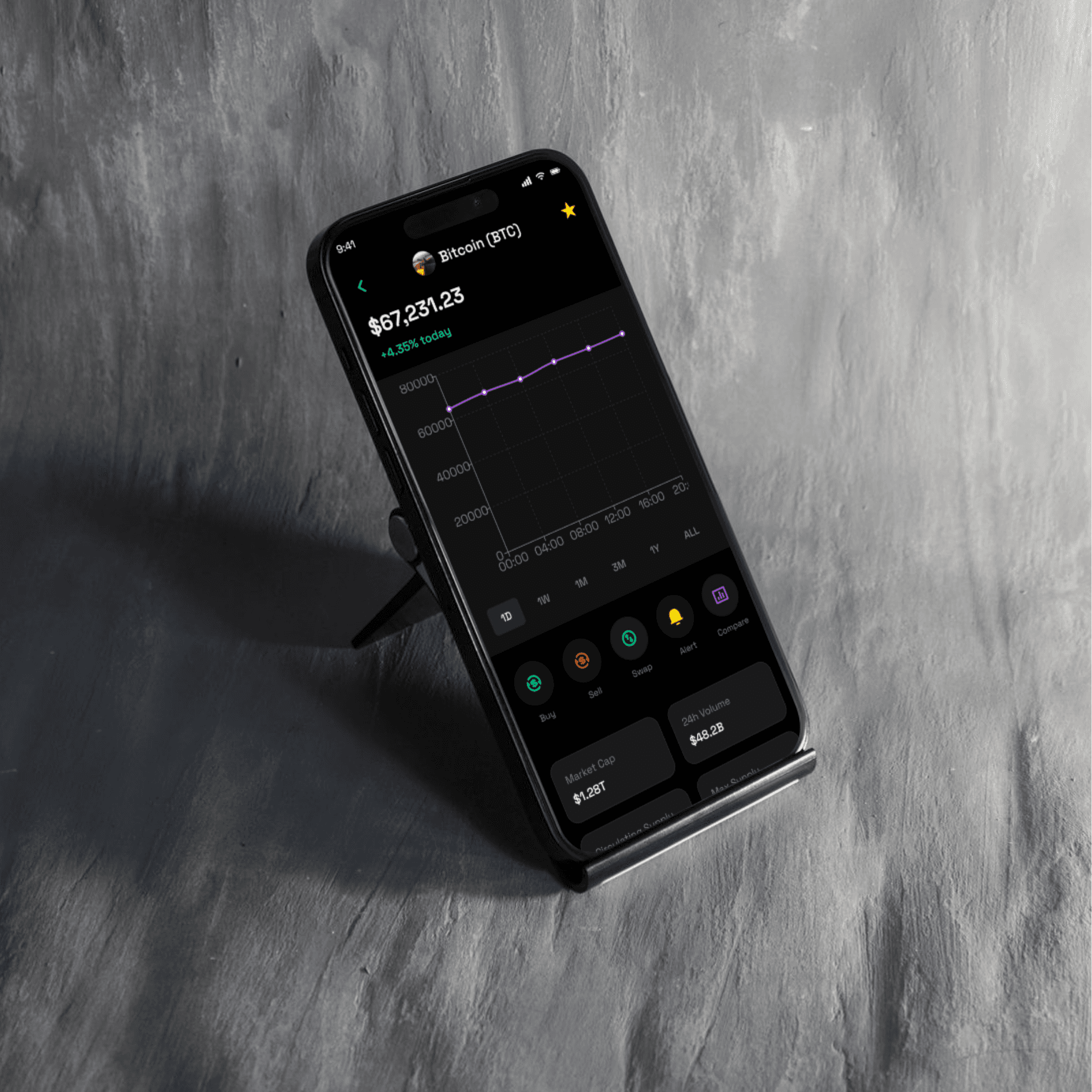
My Approach for Trading Mobile App
The Trading App is designed with simplicity and functionality in mind, catering to both experienced traders and beginners. Every element, from real-time data feeds to transaction features, is designed to offer users a streamlined and efficient trading experience. With intuitive navigation, interactive charts, and secure transactions, the app aims to deliver an easy-to-use platform for managing investments and executing trades at any time.
Vision and Innovation for Trading Mobile App
The vision behind the Trading Mobile App is to provide users with a powerful, yet accessible tool to manage and track investments, all in the palm of their hands. Through real-time stock price updates, interactive charts, and seamless trade execution, the app makes it easy to monitor the market, make informed decisions, and act quickly. By focusing on a minimalistic design and robust functionalities, the app blends the best features of professional trading platforms with a mobile-first experience.
Identifying Unique Challenges in Trading App Design
Real-Time Data: Financial markets move rapidly, and users need access to live market data, including stock prices, cryptocurrency values, and market trends.
User Interface: Trading platforms are often overwhelming for beginners. Simplifying the interface without losing key features is crucial for user engagement.
Security: Financial apps need to ensure secure transactions, privacy protection, and two-factor authentication to prevent unauthorized access.
Complexity of Trading Functions: For advanced users, the app should provide complex tools like limit orders, short selling, and portfolio tracking without being overly complicated.
Resolving Complex Problems for Trading App
Real-Time Market Updates:
The app will integrate with financial data APIs to pull live market data, including stock prices, currency rates, and cryptocurrency values. Real-time updates will allow users to make timely investment decisions and execute trades efficiently.Simplified User Interface:
To cater to both novice and experienced traders, the app will feature a clean, minimalist design. Key features like buy/sell buttons, market charts, and portfolio management will be easily accessible, with clear visual cues for traders to make informed decisions quickly.Advanced Trading Features:
For advanced traders, the app will allow access to tools like technical analysis, real-time order book, stop-loss settings, and chart overlays. These features will be integrated seamlessly without overwhelming users.Security and Privacy:
The app will prioritize bank-grade encryption, two-factor authentication (2FA), and secure payment gateways to protect users' sensitive data and financial transactions.
User-Centric Design for Trading Mobile App
Onboarding Process:
A simple, guided onboarding process for new users will help them understand the app’s basic features, such as account creation, portfolio tracking, and trade execution. Advanced users will also be able to skip onboarding and dive directly into trading.Home Screen:
The home screen will provide an overview of the user’s portfolio, displaying current holdings, balance, and performance graphs. It will also feature a market watchlist showing real-time prices of stocks and cryptocurrencies.Search and Watchlist:
The app will allow users to search for stocks, cryptocurrencies, or commodities, and add them to their watchlist for easy tracking. Users can set price alerts for specific stocks to stay informed.Transaction and Trading Screen:
This screen will be optimized for buy/sell functionality, with instant trading options, including limit orders, market orders, and stop-loss orders. It will display live price updates and allow users to track their trades in real-time.Trading Charts:
The app will include interactive charts with various timeframes (e.g., 1 minute, 5 minutes, 1 hour, 1 day) and advanced features like technical indicators (e.g., moving averages, Bollinger bands) for trend analysis.
Meeting User Needs for Trading App
Quick and Easy Trade Execution:
The app will enable instant execution of trades with a single tap. Users can quickly buy or sell any asset listed on the platform, including stocks, ETFs, cryptos, and commodities.Real-Time Notifications:
Users will receive push notifications for price changes, news updates, order completions, and portfolio performance to stay up-to-date with their investments.Portfolio Tracking:
The app will feature a detailed portfolio tracking system that shows users their asset distribution, realized/unrealized profits, and historical performance over different time periods (e.g., weekly, monthly, yearly).Custom Alerts:
Users can set custom alerts for specific price points, volume changes, or news related to the stocks they’re following.Security & User Authentication:
The app will feature multi-layer security, including fingerprint or facial recognition login, 2FA, and bank-level encryption to protect user accounts and ensure safe transactions.
Detailed Pages and Features for Trading App
Home Screen:
Portfolio Overview with performance graphs and top assets.
Real-Time Price Ticker for tracked stocks, cryptos, and indices.
Market News to keep users informed about market trends.
Navigation bar for accessing Trading, Portfolio, News, and Profile.
Search Screen:
Search Bar to find specific stocks, cryptocurrencies, or markets.
Market Overview with categories like Trending Stocks, Top Gainers, and Most Active.
Watchlist for users to track their favorite assets.
Trading Screen:
Buy/Sell Buttons with options for Market Orders or Limit Orders.
Real-Time Order Book showing bids, asks, and volumes.
Price Graphs with options to toggle between different technical indicators.
Order History and status updates for active and completed orders.
Portfolio Screen:
Asset Allocation showing how the user’s portfolio is divided between stocks, bonds, cryptocurrencies, etc.
Real-Time Portfolio Value and Performance Over Time.
Profit/Loss Report and the ability to filter by different timeframes.
Account/Profile Screen:
Account Settings, including payment methods, security settings, and 2FA setup.
Transaction History to review past trades, deposits, and withdrawals.
Notification Settings to manage alerts and news updates.
Accessibility and Optimization
A11y Optimized:
The app will be screen reader compatible, with high contrast modes, large font sizes, and easy-to-navigate interfaces to ensure inclusivity.Performance:
The app will be optimized for quick load times, real-time updates, and minimal battery consumption, ensuring a smooth experience for all users, even under low network conditions.
Conclusion for Trading Mobile App
The Trading Mobile App is designed to empower users to manage and track their investments, execute trades, and stay updated with market changes at any time. With features like real-time data, interactive charts, secure transactions, and intuitive navigation, the app caters to both novice and advanced traders. Whether users are buying stocks, tracking their portfolios, or monitoring market news, the app delivers a seamless and efficient trading experience.