My Approach for Vibe Together Mobile App
The Vibe Together Mobile App is designed to simplify the process of creating social connections, organizing events, and coordinating activities. By focusing on ease of use, personalized experiences, and seamless social interaction, the app allows users to create, join, and enjoy events together. From finding like-minded people to real-time event updates, Vibe Together ensures users feel connected and involved, no matter where they are.
Vision and Innovation for Vibe Together Mobile App
The vision behind the Vibe Together App is to foster connection in an increasingly disconnected world. In a sea of apps, Vibe Together stands out by focusing on group dynamics, allowing users to create and join events, explore new activities, and build lasting relationships. Whether it’s a weekend hangout or a large social gathering, the app brings people together with fun, interactive features.
Event Discovery: Personalized recommendations based on user interests and location.
Social Interaction: Real-time messaging, polls, and feedback within events.
Seamless Planning: A user-friendly platform for creating events and coordinating details.
Identifying Unique Challenges for Vibe Together Mobile App
Event Discovery & Matching: Users may struggle to find activities or people with similar interests.
User Engagement: Keeping people actively engaged in events and social circles can be challenging.
Event Coordination: Organizing events involves a lot of logistics and communication. Simplifying this process is essential.
Privacy & Security: Ensuring that user data is protected, and event interactions are safe and private is crucial.
Resolving Complex Problems for Vibe Together Mobile App
Event Discovery & Matching:
Implement a smart recommendation system based on user interests, locations, and previous interactions.
Offer filters such as activity type, date, time, and location to find events easily.
Add a “Friends of Friends” feature, allowing users to explore events through mutual connections.
User Engagement:
Introduce real-time event chat, where users can discuss and share updates related to the event.
Enable users to share their experiences and photos during and after events, creating a social wall of memories.
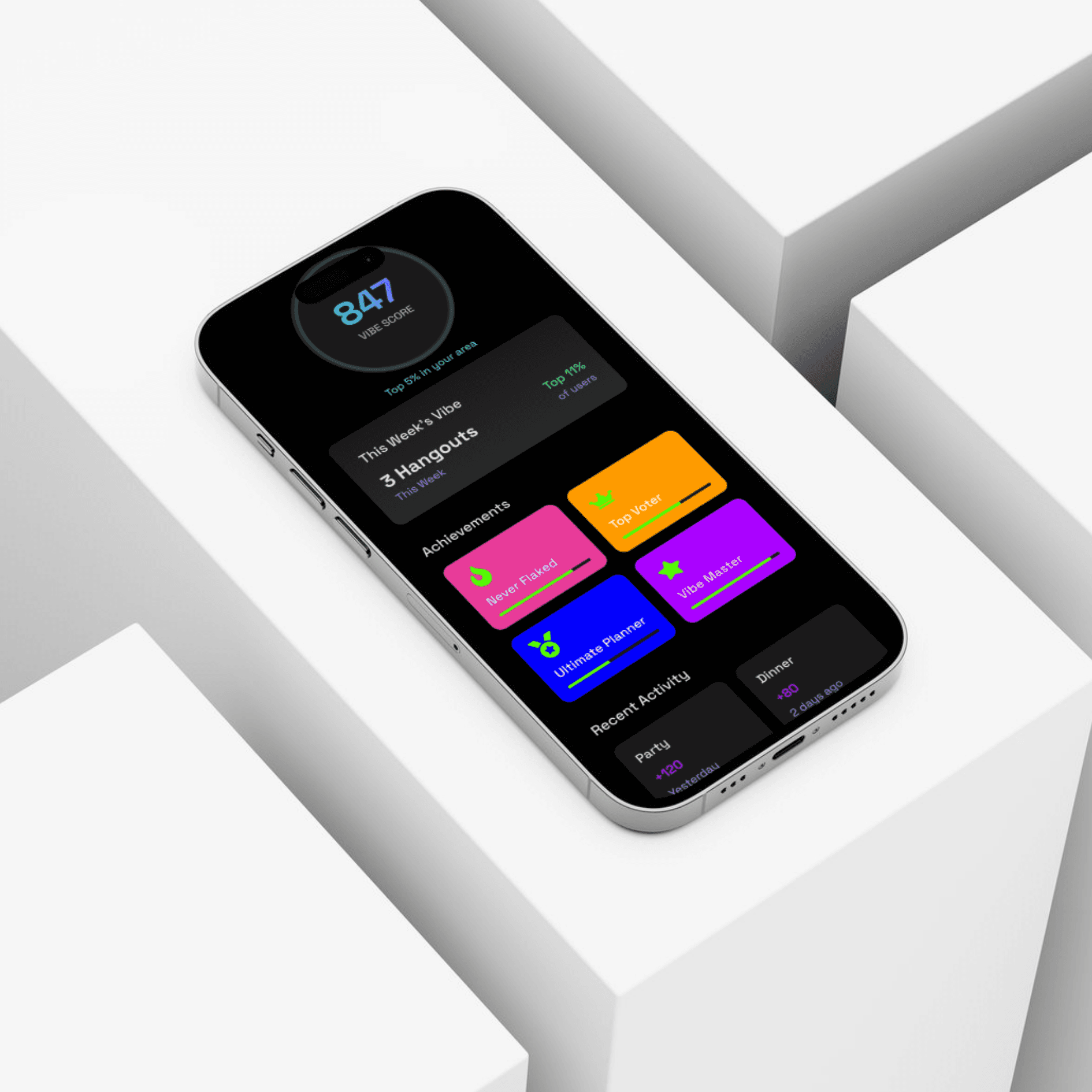
Gamification elements, like badges or points for event participation, can keep users excited.
Event Coordination:
Allow users to create events with easy-to-fill templates and calendars.
Provide integrated tools like RSVP tracking, guest lists, reminder notifications, and event updates.
Include features like polls, suggestions, and feedback for real-time input on event details.
Privacy & Security:
Implement user profiles where users control what they share, ensuring privacy.
Enable privacy settings for each event, where users can decide if it’s open to everyone, friends only, or invitation-only.
Use end-to-end encryption for chat messages and data protection for personal information.
User-Centric Design for Vibe Together Mobile App
Onboarding Process:
The onboarding will be simple, focusing on interest-based signups. Users can choose categories such as sports, music, food, and more. This helps the app tailor recommendations and notifications right from the start.Home Screen:
The Home screen will feature a feed of upcoming events based on the user’s interests and social network.
Users can view events around them, top trending events, or suggested activities from friends.
Event Creation:
Users can create an event in a few simple steps—select a category, set a date, and invite participants.
Add features like location sharing, RSVP buttons, guest list management, and notes for attendees.
An Event Chat Room will be automatically created once an event is set, allowing participants to discuss details and share information.
Event Discovery:
An easy-to-use event search with filters for location, time, and type.
Suggested Events based on the user’s location and interests (using AI-driven recommendations).
Users can RSVP with a single tap and receive event reminders and notifications.
Social Feed:
After an event, users can post photos, videos, and comments in an event’s feed.
The Activity Feed will show all the events a user is interested in or has attended, fostering social interaction and connection.
Messaging and Notifications:
Real-time chat functionality for users to communicate within events and with friends.
Push Notifications for event updates, invitations, and reminders to stay engaged.
Meeting User Needs for Vibe Together Mobile App
Easy Event Creation & Discovery:
The app will allow users to easily create events and invite others. It also helps users find events based on their preferences and location.
Personalized Recommendations:
Using algorithms, the app will suggest events that are likely to interest the user, based on past behavior, preferences, and social circles.
Real-Time Interaction:
The app will support live chat and real-time updates within events, ensuring that users feel connected before, during, and after events.
Social Sharing:
Allow users to share their experiences through photos, videos, and stories in a centralized event wall.
Gamification:
Reward users for attending multiple events with points, badges, and the ability to unlock premium event features or customizations.
Detailed Pages and Features for Vibe Together Mobile App
Home Screen:
Personalized Feed of upcoming events, trending activities, and nearby events.
Navigation Bar for easy access to events, friends, chat, and settings.
Event Creation Page:
Event Form to add event details such as type, date, location, and invitees.
RSVP Options and automated reminder notifications.
Event Discovery Screen:
Search Bar for finding events based on type, location, and date.
Suggested Events and trending activities for users to explore.
Event Chat Room:
A group chat where event members can chat before and after the event.
Option for event announcements and updates to be pushed to all attendees.
Profile Page:
A user profile where individuals can manage their settings, interests, events, and friends list.
See past event participation and achievements.
Accessibility and Optimization
A11y Optimized:
The app will ensure easy navigation, including screen reader support, and options for high contrast mode and larger font sizes for better readability.
SEO and Performance:
The app will be optimized for fast load times, low battery usage, and smooth navigation, even in low network areas.
Conclusion for Vibe Together Mobile App
The Vibe Together App is designed to enhance social interactions by simplifying the process of creating, finding, and participating in events. With a focus on real-time engagement, personalized event recommendations, and seamless coordination, the app ensures that users can connect with others and make the most of their time. Whether it’s a small get-together or a large public event, Vibe Together helps users build social experiences effortlessly.